
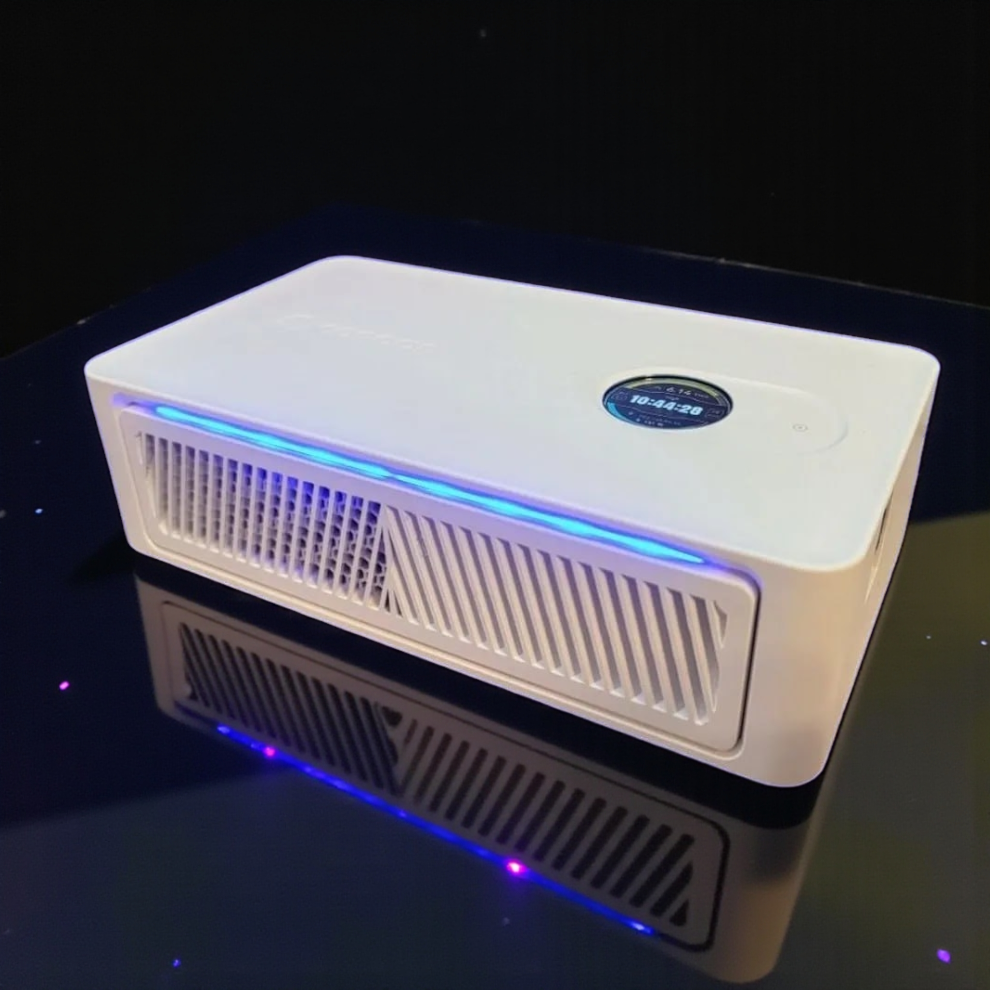
Specification review disclosure: CryptoCloaks sells the Avalon Nano 3S. The specifications and safety information in this article come from Canaan’s published material and current CryptoCloaks product information. Any noise, power, dimensions, weight, or performance figure below is attributed to its source rather than presented as a CryptoCloaks shop measurement.
Quick verdict: The Canaan Avalon Nano 3S is a good first home Bitcoin miner for someone who wants meaningful SHA-256 hashrate in a compact, low-power device. Canaan rates it at 6 TH/s, 140W maximum, and 33 to 40 dB. That makes it easier to place and power than a full-size ASIC, but it is still an always-on miner with fan noise, warm exhaust, and no guaranteed payback.[1]
Current CryptoCloaks option: See the Canaan Avalon Nano 3S at CryptoCloaks. The listing was $215 with the PSU included when checked on September 14, 2026, and displayed a 4.93/5 rating from 30 reviews. Check the product page for current price, variant, availability, and shipping information.[2]
Verified Canaan Avalon Nano 3S specifications
Canaan publishes 6T hashrate, 140W maximum power, 20.5 × 11.5 × 5.85 cm dimensions, about 0.86 kg net weight, 28V input, and 33 to 40 dB noise.[1] The efficiency figure above is simple specification math: 140 watts divided by 6 TH/s. It is not a wall-power measurement from our shop.
What 140W means at home
At Canaan’s 140W maximum specification, one Nano 3S uses up to 3.36 kWh in 24 hours or 100.8 kWh over 30 days if it runs continuously at that draw.[1] Your actual bill depends on your rate and operating time.
These are electricity-cost examples, not mining-profit estimates. They use the published 140W maximum and assume 24/7 operation. Pool payout, network difficulty, fees, Bitcoin price, uptime, and the exact power seen at your outlet can all change. There is no honest fixed monthly earnings or break-even promise to make here.
A miner also turns nearly all of the electricity it uses into heat in the room. At 140W, that is roughly 478 BTU/h. Treat it as supplemental desk or small-space heat, not as a replacement for a full-size room heater.
Noise, size, and placement
Canaan’s published 33 to 40 dB range is quieter on paper than a full-size industrial ASIC, but it does not mean silent.[1] Sound changes with fan speed, room temperature, placement, and the surfaces around the miner. If you need a silent bedroom or recording-room device, skip it. If normal fan noise is acceptable in an office, workbench area, basement, or cool room, the Nano 3S is a more realistic fit.
The 20.5 × 11.5 × 5.85 cm chassis is genuinely compact.[1] Give the intake and exhaust open space anyway. Do not put an air-cooled miner in a sealed cabinet or bury its adapter under other equipment.
Power adapter and USB-C safety note
Use the bundled adapter and cable, seat the USB-C plug completely, keep strain off the cable, and avoid humid or condensing locations. Canaan says it received limited reports of USB-C connector overheating or melting on some Nano 3S units under continuous high load, humidity, or with partially seated plugs. Canaan also says newer production uses higher-current-rated connectors and that it offers a no-time-limit free upgrade or replacement for affected users.[5]
Power the miner off immediately if you notice abnormal heat or odor, then contact Canaan support with the serial number and photos.[5] This is a manufacturer notice, not a failure observed by CryptoCloaks.
Setup expectations
The hardware is compact, but it is still a Bitcoin miner. Before ordering, plan for:
- The correct US or EU adapter variant for your location.
- A stable network connection and a Bitcoin mining pool or solo-mining endpoint.
- A wallet address you control for payouts.
- Open intake and exhaust space.
- A first-day check of the power connection, reported hashrate, fan behavior, and temperature.
- A room where roughly 140W of continuous heat and audible airflow are acceptable.
Use Nano 3S-specific accessories for organization or cooling. BitAxe stands and Canaan Q shrouds belong to different product families and are not the right fit for this miner.
Solo mining or pool mining?
The Nano 3S can send SHA-256 work to a compatible pool or solo-mining endpoint. Pool mining is the steadier way to observe small payouts, while solo mining exchanges that consistency for a very small chance of finding a block. Neither path supports a guaranteed return.
Choose the mode based on why you are buying it. Use a pool if you want measurable day-to-day participation. Use solo mining if you understand the lottery-like odds and value the chance itself. Do not choose either based on a fixed earnings screenshot or an old Bitcoin price.
Who should buy the Nano 3S?
Buy it if you want:
- a compact first ASIC for learning home Bitcoin mining;
- 6 TH/s without the electrical and ventilation project of a full-size miner;
- supplemental heat from hardware that is also hashing;
- a simple single-miner setup with the PSU included;
- a miner you can run on a desk, shelf, or workbench with proper airflow.
Skip it if you need:
- silent operation;
- predictable profit or a guaranteed payback date;
- enough heat to replace a conventional room heater;
- industrial-scale hashrate;
- a device you can ignore after plugging it in.
The buying decision
The Nano 3S is worth buying when the goal is a compact, approachable way to run real Bitcoin mining hardware at home. The published 6 TH/s at 140W maximum is the core reason to choose it. The tradeoffs are continuous heat, fan noise, the need to watch the USB-C power connection, and mining economics that can change without warning.[1][5]
It is not the right purchase for someone chasing a promised monthly return. It is the right purchase for a Bitcoiner who wants to learn, hash, and make use of a modest amount of heat without building a full mining room.
Best single-miner path: Buy the Canaan Avalon Nano 3S from CryptoCloaks. The current listing includes the PSU; verify the plug variant, live price, and availability before checkout.[2]
Want two miners in one organized setup? The Canaan Avalon Nano 3S Dual Cooler Box Bundle includes two 6 TH/s miners and one fully built Dual Cooler box, for 12 TH/s total and about 280W based on Canaan’s per-miner maximum specification.[3]
Already have Nano 3S units? Use the purpose-built Canaan Nano 3S Cooler Box, Dock & Stand path instead of a BitAxe stand or Canaan Q shroud. Confirm the current size and included components on the product page before ordering.[4]
Canaan Nano 3S FAQ
Does the Nano 3S use 1,200W?
No. Canaan lists the Avalon Nano 3S at 140W maximum, not 1,200W.[1]
How much hashrate does it have?
Canaan rates it at 6 TH/s for SHA-256 Bitcoin mining.[1]
How loud is it?
Canaan publishes a 33 to 40 dB noise range.[1] That is a specification, not a CryptoCloaks room measurement, and actual sound depends on placement and operating conditions.
Is the power supply included?
The current CryptoCloaks single-miner listing says the PSU is included.[2] Select the correct plug variant and verify the current product details before ordering.
Will it pay for itself in a few months?
No fixed payback period can be promised. Mining output and value depend on changing network difficulty, pool terms, Bitcoin price, fees, uptime, and electricity cost.
Can I use a BitAxe stand or Canaan Q exhaust shroud?
No. Use Nano 3S-specific organization and cooling products. CryptoCloaks has a Nano 3S Dual Cooler bundle and a dedicated Nano 3S Cooler Box, Dock & Stand.[3][4]
Where do these specifications come from?
This is a specification review based on Canaan’s published material and current CryptoCloaks product information. The cited figures are not presented as CryptoCloaks shop measurements.
Bottom line
The Canaan Avalon Nano 3S is a compact 6 TH/s home Bitcoin miner rated for 140W maximum. That combination makes sense for a first-time home miner, a learning setup, or supplemental heat. Buy it for those reasons, not because anyone promises a fixed income or a fast return.