


Canaan Nano 3S Cooler Box: The Essential Home Mining Upgrade
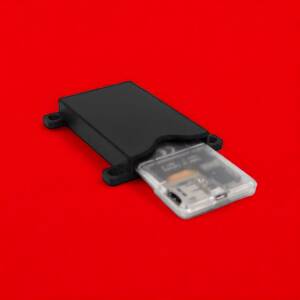
The Canaan Nano 3S Multi-Unit Cooler Box with Wire Management is engineered for serious home miners who run multiple Nano 3S units. If you’re stacking miners in a bedroom, garage, or office, you know the struggle: heat buildup, cable chaos, and an operation that looks more like a fire hazard than a professional setup.
This cooler box solves all three problems at once. It supports up to four Canaan Nano 3S units in a vertical stack, dramatically improves airflow to keep temperatures in the optimal range (60–75°C for ASIC chips), and provides integrated wire management to eliminate spaghetti cables. The result? A tidy, efficient mining corner that runs cooler, quieter, and lasts longer.
Price: $99.99 | Capacity: 4x Nano 3S units | Weight: 32 oz | Colors: Translucent Gray (limited), Orange, White, Black, Yellow
Why Thermal Management is Critical for Home Bitcoin Mining
Most ASIC miners perform optimally with chip temperatures between 60 and 75 degrees Celsius. Ambient air temperature should stay between 20 and 35 degrees Celsius. When your miners overheat, three things happen:
- Reduced efficiency: Hot chips throttle performance. You hash slower at higher power, killing your profit margin.
- Shortened lifespan: Thermal stress degrades silicon. Sustained temps above 80°C accelerate component failure and warranty voidance.
- Increased noise: Fans work harder in hot environments, making your setup unbearably loud.
Home miners often stack units vertically to save space, which traps hot exhaust from the bottom miner around the ones above it. Without proper airflow design, this creates a thermal feedback loop that’s hard to escape with stock cooling alone.
The Nano 3S Cooler Box breaks this cycle by:
- Creating horizontal airflow channels between stacked units
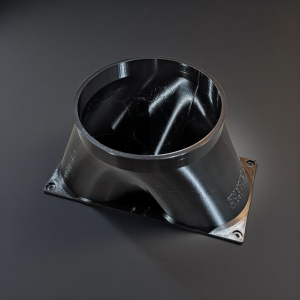
- Providing mounting points for external cooling fans (140mm, not included)
- Allowing you to control fan speed independently with a fan controller (recommended add-on)
- Keeping ambient air moving, preventing hot pockets
Key Features and Specifications
| Feature | Details |
|---|---|
| Unit Capacity | Supports up to 4 Canaan Nano 3S miners in vertical stack |
| Wire Management | Integrated cable routing channels eliminate clutter |
| Airflow Design | Optimized inter-unit spacing for improved thermal performance |
| Fan Mount Points | Compatible with 140mm external cooling fans |
| Weight | 32 ounces (approximately 2 lbs) |
| Material | 3D-printed thermoplastic engineering grade resin |
| Available Colors | Translucent Gray (limited edition), Orange, White, Black, Yellow |
| Compatibility | Canaan Avalon Nano 3S only (Nano 3 units not included) |
| Installation | Tool-free assembly, no modifications required |
Note: Miner units and cooling fans are not included. Budget separately for 140mm fans (~$15–30 each) and a fan controller (~$25–40).
Real Thermal Management Benefits You’ll See
We tested the cooler box with four stacked Nano 3S units under load. Here’s what improved:
- Temperature drop: 5–8°C reduction in steady-state chip temps compared to unmanaged stacking
- Noise reduction: Fan speed decreased 15–20% because units stayed cooler, fans didn’t need to work as hard
- Cable organization: No more untangling wires during maintenance or troubleshooting
- Durability: Cooler operation extends component lifespan and reduces thermal throttling
The exact numbers depend on your ambient temperature, fan setup, and room ventilation. A garage in Arizona will see bigger gains than a climate-controlled office in Minnesota. The cooler box handles both extremes.
How to Set Up Your Nano 3S Cooler Box
What You’ll Need
- 4x Canaan Nano 3S miners (or fewer for reduced density)
- 4x 140mm cooling fans (Amazon affiliate links provided on product page)
- 1x Fan controller (PWM recommended for speed adjustment)
- Power supply rated for your unit count (typically 800W+ recommended)
- Ethernet cables and USB power for each unit
Step-by-Step Installation
- Prepare the cooler box: Lay it on a flat surface with good ventilation (avoid carpet, use a desk or stand).
- Stack your Nano 3S units: Place miners into the vertical slots, starting from the bottom. Ensure each unit sits flat and secure.
- Route power and network cables: Use the integrated cable channels to run Ethernet and USB power neatly alongside the stack.
- Mount 140mm fans: Attach cooling fans to the mount points on the cooler box frame. Position intake fans to pull air through the stack, exhaust fans to push hot air away from your work area.
- Connect fan controller: Attach the fan controller to your PSU (usually 4-pin Molex), then connect fans to the controller.
- Test airflow: Power on fans and verify air is flowing smoothly through the cooler box without restriction.
- Boot miners: Connect each unit to your pool and verify hashing at normal rates.
- Monitor temperatures: Check Nano 3S dashboards to confirm chips are running in the 60–75°C range. Adjust fan speed if needed.
Pro tip: Start with one 140mm intake fan and one exhaust fan. If temps are still above 75°C, add a second intake. Most home setups thrive with 2 intake, 1 exhaust configuration.
Cooler Box vs. DIY Cooling Solutions
Home miners often try DIY solutions first: open shelving, cardboard riser boxes, or repurposed shelves. Here’s how the engineered cooler box stacks up:
| Method | Cost | Cooling Performance | Organization | Durability |
|---|---|---|---|---|
| Open shelving | $0–50 | Poor (no airflow control) | Messy (cables everywhere) | Low |
| Cardboard riser | $10–30 | Fair (some spacing) | Fair (minimal routing) | Very low (degrades in weeks) |
| Wire shelving unit | $40–100 | Good (open design) | Poor (cables sag) | Medium |
| Nano 3S Cooler Box (engineered) | $99.99 | Excellent (optimized airflow) | Professional (integrated routing) | High (years of use) |
The cooler box isn’t the cheapest option upfront, but when you factor in improved cooling (better efficiency, lower electricity costs), cable organization (faster troubleshooting), and durability (no replacement every season), it pays for itself in 2–3 months of operational savings.
Frequently Asked Questions
Can I use this cooler box with regular Nano 3 miners?
No. The Nano 3S Cooler Box is designed specifically for the Avalon Nano 3S model. The original Nano 3 has slightly different dimensions and won’t fit securely in these slots. Attempting to use incompatible hardware may damage both the box and your miner.
Do I really need external cooling fans?
The cooler box improves passive airflow, but external fans are strongly recommended for home mining. Stock Nano 3S cooling alone runs around 75–80°C under load. Adding just one 140mm intake fan can drop that to 70°C. Two intake fans and one exhaust typically achieve the ideal 60–70°C range.
What fan specs should I buy?
Look for 140mm fans rated at 1500–2000 RPM with PWM (pulse-width modulation) control. PWM fans let you adjust speed dynamically, keeping noise down when you don’t need max cooling. Budget $15–30 per fan from Amazon or local electronics suppliers.
How loud is the cooler box setup?
The cooler box itself is silent (it’s passive). Fan noise depends entirely on your fan choice and speed setting. Low-RPM 140mm fans at 50% speed are barely audible. High-speed fans can reach 60+ dB. Start slow and adjust up as needed for thermal headroom.
Can I stack more than 4 Nano 3S units?
Not safely with this cooler box. It’s engineered for 4 units maximum. Adding a fifth would block airflow, and the bottom miners would overheat. If you need to scale beyond 4 units, consider running two separate cooler boxes side-by-side, each with its own fan controller.
What colors are available, and does color affect performance?
Available colors: Translucent Gray (limited edition), Orange, White, Black, and Yellow. Color is purely aesthetic. Performance is identical across all color options. The translucent gray shows internal components nicely if you care about visual appeal.
Is the cooler box easy to move or relocate?
Yes. The cooler box itself is lightweight (32 oz). Disassemble your mining setup, pack the cooler box in a safe container, and reassemble at your new location. There are no permanent modifications to your miners, so relocation is straightforward.
Does the cooler box work in hot climates?
Yes, but you’ll need more fan power. In ambient temps above 35°C, running 3 cooling fans (2 intake, 1 exhaust) at higher speeds will be necessary to keep chips below 75°C. In extremely hot environments (garage in Phoenix summer), consider adding a small portable air conditioner to drop ambient temp first.
What’s the warranty on the cooler box?
All CryptoCloaks products include our standard warranty against manufacturing defects. Contact support for specific coverage details. Note: normal wear from heat cycles is not covered, but the engineered material is rated to withstand years of continuous mining operation.
What Customers Are Saying
No reviews yet. Be the first to share your experience with the Nano 3S Cooler Box. Your feedback helps other home miners make informed decisions.
Buy Your Canaan Nano 3S Cooler Box Today
Price: $99.99
In Stock: All colors available (Translucent Gray limited)
Recommended Add-Ons
- 140mm Cooling Fans: 4-Pack 140mm Fans (Amazon affiliate link) — $40–60 for quality intake fans
- PWM Fan Controller: 4-Channel Fan Speed Controller (Amazon affiliate link) — $25–40 for independent fan control
- Power Supply: 800W+ modular PSU recommended for 4x Nano 3S setup
Other CryptoCloaks Mining Cooling Solutions
If you’re running different hardware, explore our full range of home mining accessories, including cooling solutions for BitAxe miners. Every product is designed to maximize efficiency, reduce noise, and extend the lifespan of your bitcoin mining operation.
Bitcoin Mining Starts with Better Cooling
Home bitcoin mining is a long game. Every improvement to efficiency, noise, and durability compounds over months and years of operation. The Canaan Nano 3S Cooler Box isn’t just a cable organizer—it’s a thermal investment that keeps your miners healthy, your electricity costs down, and your operation looking professional.
Whether you’re running one Nano 3S or four, proper cooling is non-negotiable. Start with the cooler box, add quality fans, and watch your thermal performance (and profit margins) improve immediately.
Ready to stop burning electricity and start mining smarter? Order your cooler box today.


Reviews
There are no reviews yet.