
Updated August 28, 2026. The Hammer Miner Thor P2 is a dual-BM1373 home Bitcoin miner rated for up to 10 TH/s. It sits between small single-chip lottery miners and larger desktop ASICs, with three practical power levels, Ethernet and WiFi, a color display, a substantial tower cooler, and a 240W power supply in the box.
Research review disclosure
CryptoCloaks has not physically tested a Thor P2. This review separates manufacturer specifications, retailer wall-power testing, an independent hands-on video, and our own clearly labeled electricity-cost analysis. We will not present borrowed measurements as our own.
Buy the Hammer Miner Thor P2 for $449
Quick answer
Is the Hammer Miner Thor P2 worth considering?
Yes, if you want more than single-chip hashrate without moving to an industrial ASIC. Its strongest combination is 10 TH/s capability, a normal 6.8 TH/s mode at a published 88W wall draw, Ethernet plus WiFi, straightforward Thor OS controls, and a large 120mm cooling system.
- Best fit: a home miner who values quiet cooling, local controls, and flexible power modes.
- Most balanced mode: Normal at about 6.8 TH/s and 88W.
- Maximum mode: about 10 TH/s at a published 157W and 162W in one third-party video measurement.
- Main caution: it is a newly released platform with recent firmware fixes and limited long-term field history.
- Profitability reality: no home miner guarantees fiat profit or a solo block.
Hammer Miner Thor P2 specifications at a glance
| ASIC | 2 x Bitmain BM1373 SHA-256 chips |
|---|---|
| Published hashrate range | About 4.8 to 10 TH/s |
| Published wall-power range | About 50 to 162W across available sources and settings |
| Published efficiency range | About 10.4 to 16.2 J/TH using wall-power figures |
| Published noise range | 35 to 44 dB depending on mode |
| Networking | 2.4GHz WiFi and Ethernet |
| Cooling | 120mm ARGB fan, tower heatsink, eight copper heatpipes |
| Display and controller | LilyGO T-Display S3 color display/controller |
| Power | 12V DC through XT60; 240W AC power supply included |
| Miner size | Approximately 5.99 x 5.7 x 6.94 inches |
| Miner weight | Approximately 1 lb 13 oz |
| CryptoCloaks price | $449 |
What two BM1373 chips change
The P2 is not simply a larger version of a low-cost single-chip miner. Its two BM1373 chips let it reach a different operating range while still using a standard household outlet and a desktop-scale cooler. That matters because hashrate determines how many valid hashing attempts the device makes, while efficiency and wall power determine how much electricity and heat accompany those attempts.
One chip family does not guarantee one efficiency number. Chip count, silicon variation, voltage, frequency, board losses, controller overhead, fan power, power-supply efficiency, and firmware all influence the result. That is why a BM1373 label alone cannot tell you whether the complete miner will use 120W, 157W, or 162W at a particular hashrate. Complete-system measurements are more useful for electricity planning.
The dual-chip design also changes the buying comparison. The single-chip Thor X1 is easier to place where every watt matters, while the P2 trades more power and a larger cooler for substantially more maximum hashrate. The BC04 review covers a lower-cost 6 TH/s alternative built around four BM1370 chips. The P2 is aimed at someone who specifically wants the newer chip platform and a middle ground near 10 TH/s.
BM1373 is also why firmware maturity deserves attention. Newer hardware can bring improved silicon efficiency, but the control software must still manage startup, networking, thermal behavior, voltage, frequency, pool communication, and recovery. The P2’s first public firmware update arrived quickly, which shows active support but also confirms that buyers are entering a young product cycle.
Why the Thor P2 power numbers look inconsistent
This is the most important issue to clear up before comparing the Thor P2 with another miner. Different published numbers describe different measurement points, firmware versions, and settings.
The short version
- Hammer Miner advertises about 120W for the Thor P2, but the manufacturer has separately explained that roadmap power figures can be chip-level measurements, not wall-plug measurements.
- A retailer testing announcement reports 50W, 88W, and 157W measured at the wall.
- The retailer product page has also shown low-power figures around 58 to 60W.
- The Hobbyist Miner showed 162W at the wall while the unit was operating around the 10 TH/s setting.
Our planning recommendation: treat Low Power as roughly 50 to 60W, Normal as roughly 88W, and maximum operation as roughly 157 to 162W. Measure your own unit at the outlet if exact cost matters.
The difference between chip power and wall power is not automatically dishonesty. The outlet also feeds the controller, display, fan, lighting, conversion losses, and power-supply overhead. Firmware and voltage settings can move the final result too. The mistake is comparing a chip-level number for one miner with a wall number for another as though they are equivalent.
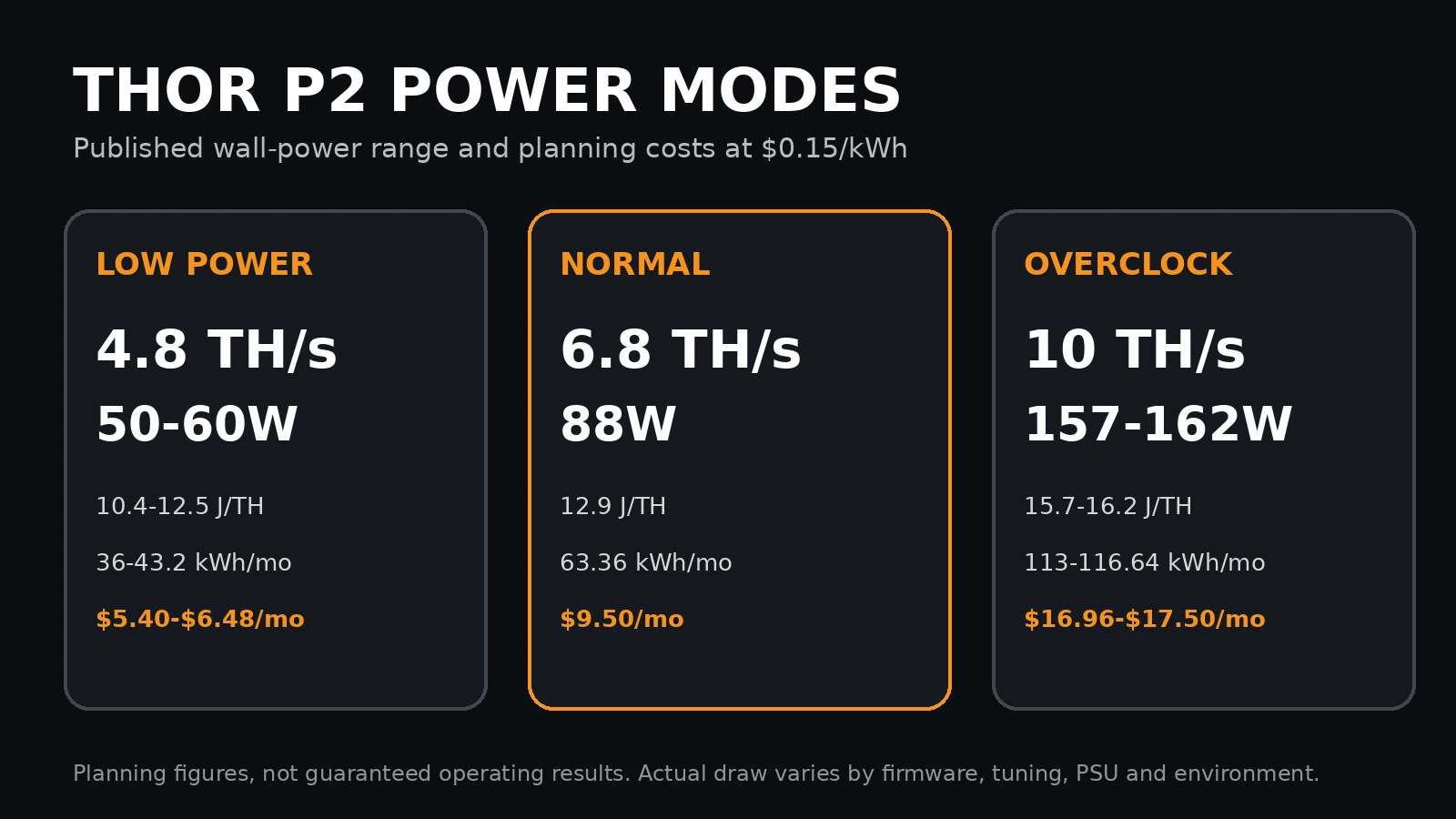
Thor P2 electricity cost by mode
The estimates below assume continuous operation for 30 days at $0.15 per kWh. They include no pool fees, downtime, demand charges, or changing electricity rates. These are operating-cost calculations, not revenue forecasts.
| Mode | Planning draw | Energy per day | Energy per 30 days | Monthly cost at $0.15/kWh |
|---|---|---|---|---|
| Low Power | 50-60W | 1.20-1.44 kWh | 36-43.2 kWh | $5.40-$6.48 |
| Normal | 88W | 2.112 kWh | 63.36 kWh | $9.50 |
| Overclock | 157-162W | 3.768-3.888 kWh | 113.04-116.64 kWh | $16.96-$17.50 |
Power consumed by a miner eventually becomes heat in the room. These settings represent roughly 171 to 205 BTU/h in Low Power, 300 BTU/h in Normal, and 536 to 553 BTU/h at the high end. That is manageable compared with an industrial ASIC, but it still matters in a small enclosed room.
What independent footage actually showed
The Hobbyist Miner published a 14-minute Thor P2 unboxing and setup video on August 25, 2026. The unit was supplied by another retailer, so it is not an anonymous laboratory test, but the footage provides useful observations beyond a specification sheet:
- The dashboard reached approximately 10.1 TH/s early in the run and showed the BM1373 chip model.
- The reviewer configured Ethernet with DHCP and pointed the miner at a locally hosted Bitcoin node and solo pool.
- Thor OS exposed pool, network, fan, ARGB, firmware update, Normal, Overclock, and Custom controls.
- The outlet meter showed approximately 162W near the 10 TH/s setting.
- The reviewer said the included power supply was more audible than the large front fan.
- A small cable clip arrived broken despite substantial protective packaging. It did not stop operation, but it is a useful reminder that 3D-printed details can be damaged in transit.
Video credit: The Hobbyist Miner. CryptoCloaks did not conduct this test and does not represent the measurements as its own.
Cooling and noise: why the 120mm design matters
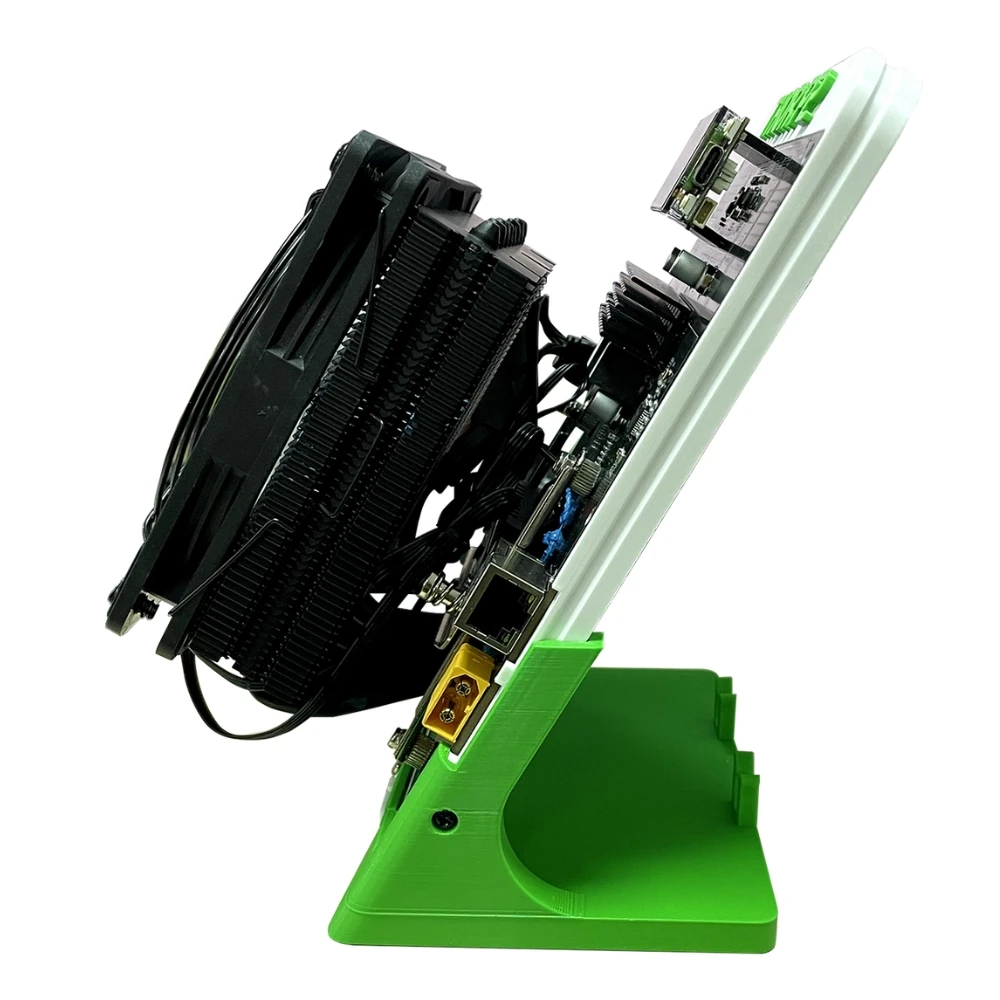
Small fans often need high RPM to move enough air, which creates the sharp pitch people associate with compact ASIC miners. The Thor P2 instead uses a 120mm ARGB fan, a large tower heatsink, and eight copper heatpipes.
Published mode-specific noise claims are 35 dB, 41 dB, and 44 dB. Room acoustics, meter distance, ambient noise, fan control, and the included power supply can all change what you experience. Treat those figures as test conditions, not a promise for every desk.
Hammer Miner has stated that a P2 ran continuously through 24-hour-plus cold and hot chamber tests at 0°C and 35°C without changes in hashrate or efficiency. That is manufacturer testing, not independent validation, but the physical cooling design gives the claim a plausible engineering basis. Keep both sides of the heatsink open and do not bury the miner in a cabinet.
Thor OS dashboard, setup, and firmware
Thor OS is Hammer Miner’s current firmware platform for the Thor X1, Thor P2, and BC08. The official description emphasizes performance, thermal control, and over-the-air updates. The web interface is one of the P2’s strongest practical advantages because a home miner should not require a separate flashing project before it can hash.
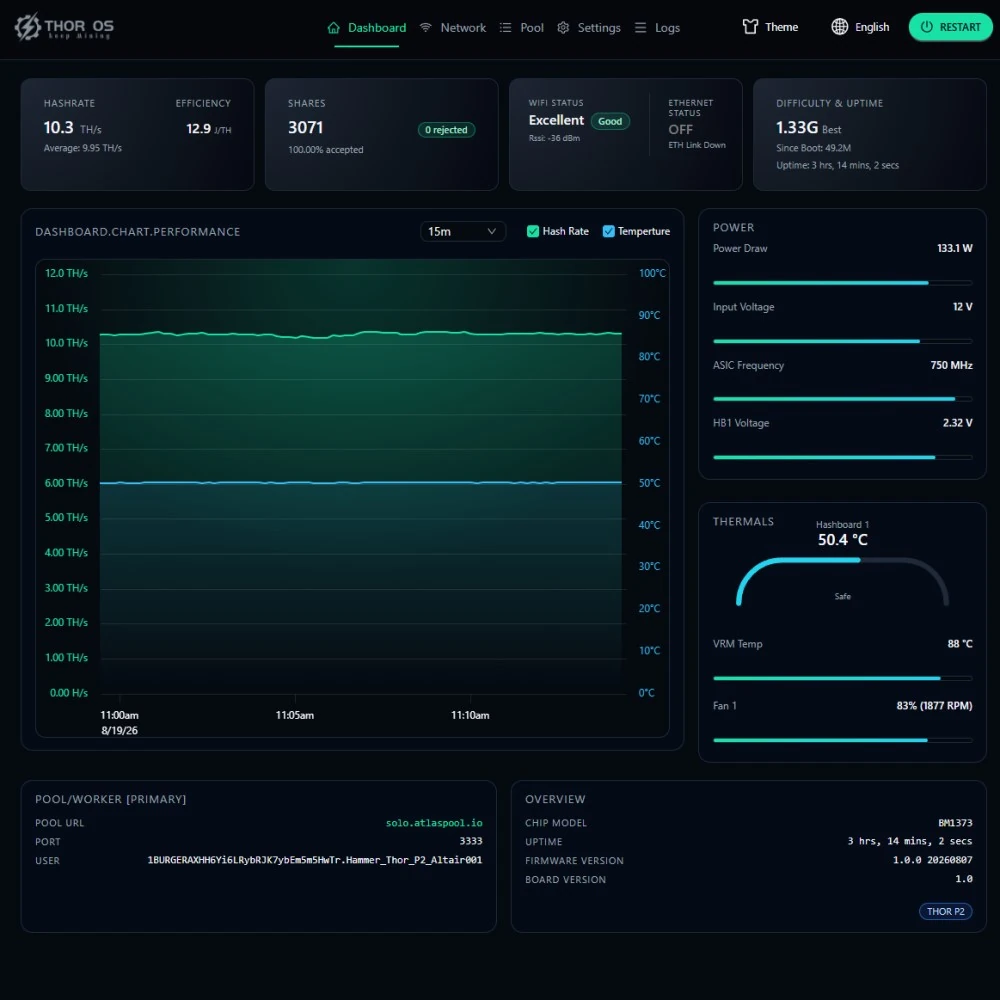
Basic Thor P2 setup sequence
- Place the miner where the 120mm fan and rear of the heatsink have clear airflow.
- Connect the included 240W supply to the miner’s XT60 input, then connect AC power.
- Use Ethernet for the most predictable first setup, or configure the supported 2.4GHz WiFi connection.
- Find the miner’s IP address through the display, router, or network-discovery method described in the current guide.
- Open Thor OS in a browser and enter your pool URL, worker or payout information, and fallback pool if desired.
- Start with Normal mode. Confirm accepted shares, temperature, fan operation, and stable power before changing settings.
- Check for an official OTA update before leaving the miner unattended for extended operation.
A wired network is not mandatory, but it removes one variable. If the miner is far from your router, a standard Cat 6 Ethernet cable is an inexpensive addition and is not listed as included with the P2.
Affiliate disclosure: As an Amazon Associate I earn from qualifying purchases.
Current firmware history matters
The official HammerMiner/P2 GitHub repository shows two public releases at the time of writing:
- V1.0.0 dated August 7, 2026: first production-candidate version.
- V1.0.1 dated August 18, 2026: release notes say it resolves occasional restarts. Hammer Miner’s announcement also identifies intermittent network anomalies and memory-exhaustion restarts.
This is not a reason to dismiss the hardware, but it is evidence that the platform is new. Update before troubleshooting an early firmware build. Buyers who require years of field history should wait for more long-duration reports.
How to verify a new Thor P2 during the first 24 hours
A first-day check should focus on stability, not immediately chasing the highest possible hashrate. Start with a known-good outlet, clear airflow, Ethernet if available, current firmware, and the Normal profile. Record the firmware version and default settings before changing anything.
- Confirm accepted shares: a dashboard hashrate without accepted pool-side work is not enough. Verify that the pool recognizes the worker and that rejected shares are not unusually high.
- Compare short and long windows: hashrate fluctuates. Review the miner dashboard and pool-side average over several hours instead of judging a one-minute peak.
- Watch each chip: confirm that both BM1373 chips report and remain active. A total hashrate far below the selected profile can indicate that one chip, a setting, or the network path needs attention.
- Check temperature trend: the absolute number matters less than whether temperature stabilizes. A continued climb suggests blocked airflow, excessive ambient heat, an aggressive setting, or a fan-control problem.
- Measure at the outlet: a plug-in watt meter distinguishes wall draw from dashboard estimates. Compare the result with the broad ranges in this article, not one supposedly universal number.
- Test recovery: after the miner has been stable, document its IP address and configuration. Confirm that it reconnects to the network and resumes hashing after a controlled restart.
- Inspect the physical assembly: check the stand, cable clips, fan leads, heatsink clearance, XT60 connector, display, and PSU before leaving the machine unattended.
Only after that baseline is stable should you compare Low Power, Normal, and Overclock behavior. Change one setting at a time and keep notes. If a later firmware update changes power or hashrate, a baseline gives you evidence rather than a vague impression that the miner feels different.
If your goal is quiet home operation, evaluate sound where the device will actually live. A phone app is not a calibrated sound meter, but repeated readings from the same location can still compare profiles. Listen separately for fan airflow, fan bearing noise, electrical noise, and the PSU. A single published dB value cannot describe all four.
Pool mining or solo mining?
Pool mining
Contributes work to a pool and receives payouts according to that pool’s rules, thresholds, fees, and accounting method. A 10 TH/s device is still a tiny share of the Bitcoin network, so understand minimum payouts before choosing a pool.
Solo mining
Each valid share is another independent attempt to find a block, but outcomes are extremely high variance. Running longer or adding hashrate creates more attempts, not a guaranteed win.
The P2 can be pointed at a conventional pool, a solo pool, or a compatible local setup. The reviewer footage demonstrates mining to a locally hosted Bitcoin node and pool. That does not make the block odds favorable or predictable. Network hashrate and difficulty change continuously, so static “one in X years” claims age quickly.
Why 10 TH/s still does not guarantee mining profit
Ten terahashes per second sounds large beside a one-chip desktop miner, but it remains a very small fraction of the Bitcoin network. Pool revenue changes with network difficulty, transaction fees, pool accounting, uptime, and Bitcoin’s market price. Solo outcomes are even less predictable because the miner either finds a valid block or it does not.
The correct financial comparison starts with controllable costs. Use your actual electricity rate, measured wall power, expected uptime, and any pool fees. Then model revenue separately with current network data. Do not compare today’s revenue estimate with a fixed electricity number and assume the spread will continue indefinitely.
Heat can also have value or cost depending on the season. At maximum operation, the P2 releases roughly the same heat into the room as a 157 to 162W electric load. That can offset a small amount of heating in winter and increase air-conditioning demand in summer. It does not create free energy.
For a deeper explanation of solo variance, payout expectations, and changing network conditions, read our home Bitcoin solo-mining reality check. The hashrate is different, but the underlying probability lesson is the same.
Thor P2 vs Thor X1, BC04, BC08, and KBox
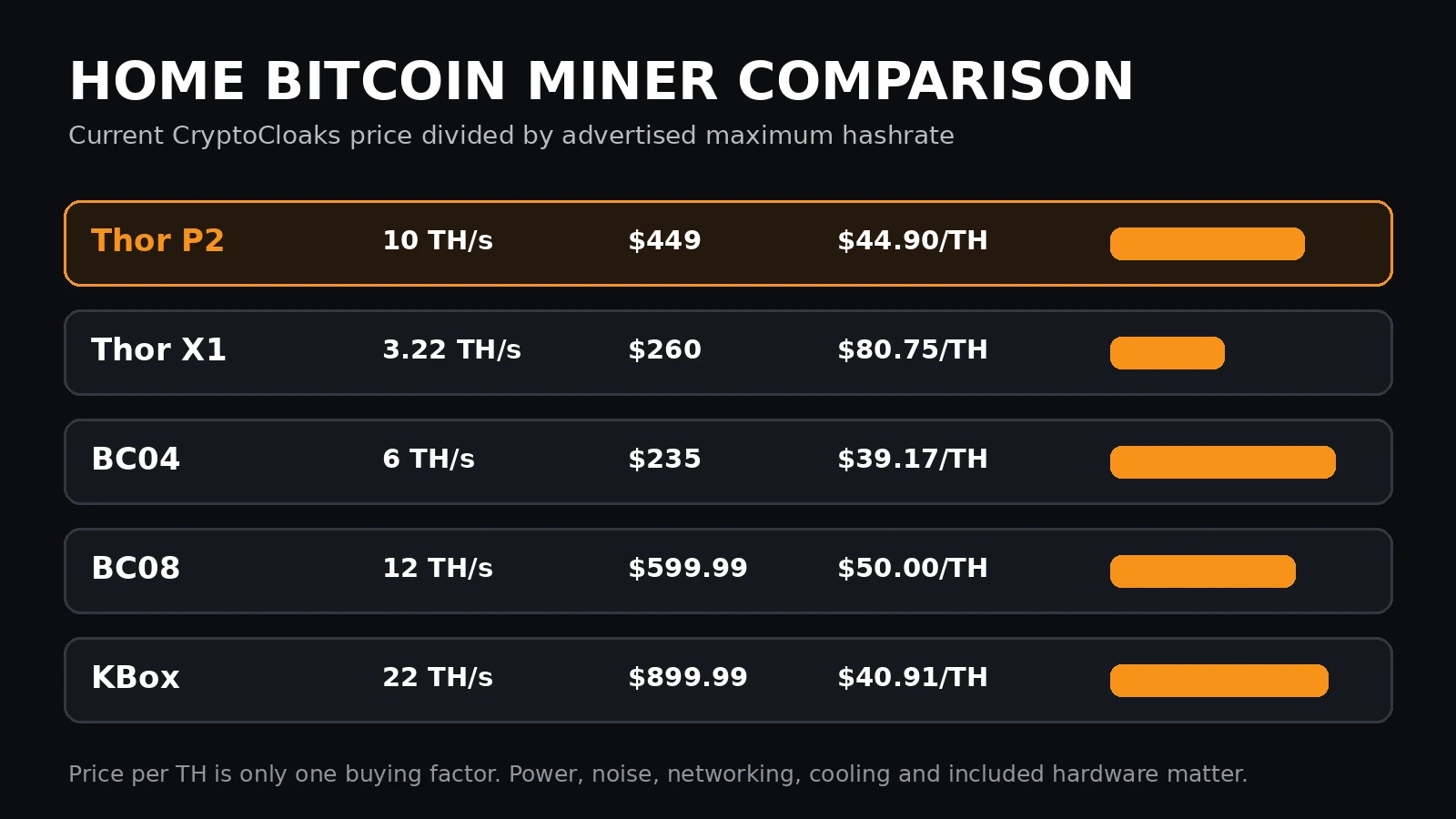
The table uses current CryptoCloaks prices and advertised maximum hashrates as of August 28, 2026. Price per TH is useful for shopping, but it ignores efficiency, noise, included power hardware, firmware, warranty, and tuning behavior.
| Miner | Maximum hashrate | Published power range | Price | Price per max TH | Best fit |
|---|---|---|---|---|---|
| Thor P2 | 10 TH/s | 50-162W across published modes/tests | $449 | $44.90 | Modern dual-BM1373 middle tier |
| Thor X1 | 3.22 TH/s | 22-46W | $260 | $80.75 | Lowest-power BM1373 entry |
| BC04 | 6 TH/s | About 110W published | $235 | $39.17 | Lower-cost desktop hashrate |
| BC08 | 12 TH/s | Up to 210W | $599.99 | $50.00 | Touchscreen experience and more hashrate |
| KBox | 22 TH/s | 178-322W presets | $899.99 | $40.91 | Highest hashrate and US manufacturing |
What the Thor P2 does better
- More maximum hashrate than the Thor X1 and BC04.
- Lower published maximum wall draw than the BC08 and KBox.
- Ethernet plus WiFi, instead of WiFi-only networking on some compact miners.
- Included 240W power supply with headroom for the published overclock profile.
- Large, slow-fan cooling rather than a tiny high-RPM fan.
What the Thor P2 does not win
- It does not have the lowest purchase price.
- It does not have the lowest current price per advertised TH.
- It does not have the highest hashrate.
- It does not yet have years of public firmware and reliability history.
- Maximum hashrate is not its most efficient operating point.
That is why Normal mode may be the P2’s best everyday argument. It gives more hashrate than the BC04 at a published 88W wall draw while retaining the newer chip platform, Ethernet, display, and larger cooler.
What comes with the Thor P2?
- Hammer Miner Thor P2 assembled on its ABS stand
- Dual-BM1373 hashing hardware
- 120mm ARGB fan and tower cooling system
- LilyGO T-Display S3 controller/display
- 240W AC-to-12V power supply with XT60 output
- Two listed AC cables, US and EU
A network cable is not listed as included. Bitcoin node hardware is not required for normal pool operation. Running your own node and compatible pool is an optional sovereignty-focused setup, not a prerequisite for turning the miner on.
Who should buy the Thor P2?
Good fit
- You want around 10 TH/s without industrial ASIC power.
- You value Ethernet, a display, and a polished local dashboard.
- You want adjustable power rather than one fixed operating point.
- You understand solo-mining variance or pool payout thresholds.
- You are comfortable keeping firmware current.
Skip or wait
- You need guaranteed mining profit.
- You want silent, fanless hardware.
- You need long-term reliability data before buying.
- You cannot provide open airflow around the cooler.
- You want the absolute lowest price per advertised TH.
Hammer Miner Thor P2 review verdict
The Thor P2 occupies a useful middle position in the home-mining market. It is materially more capable than a single-chip desktop miner, but its maximum wall draw remains far below a full industrial ASIC. The cooling, Ethernet connection, display, included PSU, and Thor OS interface make it easier to treat as an appliance rather than a loose development board.
The best published case for the P2 is not simply “10 TH/s.” It is the ability to choose between roughly 4.8 TH/s at 50 to 60W, 6.8 TH/s at 88W, and 10 TH/s around 157 to 162W. The normal setting looks like the practical center. The main reason to remain cautious is software maturity: firmware V1.0.1 already addressed network and restart problems, and long-term independent reports are still limited.
For buyers who accept those tradeoffs, the Thor P2 is one of the more complete 10 TH/s home Bitcoin mining packages currently available.
Get the Hammer Miner Thor P2 Compare home Bitcoin miners
Hammer Miner Thor P2 FAQ
Did CryptoCloaks physically test the Thor P2?
No. This is a research review based on manufacturer material, retailer wall-power tests, official firmware history, public product data, and a credited third-party hands-on video. We label derived calculations separately.
What is the Thor P2’s actual wall power?
Available sources support a practical range of roughly 50 to 60W in Low Power, about 88W in Normal, and about 157 to 162W near 10 TH/s. Exact draw can vary with firmware, voltage, temperature, fan behavior, lighting, and PSU efficiency.
Does the Thor P2 really reach 10 TH/s?
The product is rated for up to 10 TH/s, and third-party footage showed the dashboard around 10.1 TH/s early in operation. Pool-side hashrate fluctuates, so evaluate performance over a longer window.
Why does Hammer Miner advertise 120W?
Hammer Miner has stated that some roadmap power figures are chip-level measurements rather than wall-plug readings. Wall power includes the controller, fan, display, lighting, conversion losses, and other overhead.
Does the Thor P2 include a power supply?
Yes. The package is listed with a 240W power supply that converts AC input to 12V DC and connects to the miner through XT60.
Does the Thor P2 support Ethernet and WiFi?
Yes. It supports Ethernet and 2.4GHz WiFi. Ethernet is the better starting choice when stable connectivity is more important than cable-free placement.
How loud is the Thor P2?
Published mode-specific figures range from 35 to 44 dB. One reviewer said the included PSU was more noticeable than the large front fan. Your room and measurement method can produce different results.
Can the Thor P2 solo mine Bitcoin?
Yes. It can connect to a compatible solo pool or local node-and-pool setup. Solo mining remains extremely high variance and never guarantees a block.
Can the Thor P2 mine with a regular pool?
Yes. Enter the pool URL and worker or payout details in Thor OS. Check the pool’s payout threshold and fees because 10 TH/s is still a small share of total Bitcoin network hashrate.
What is the latest Thor P2 firmware discussed here?
Version 1.0.1 dated August 18, 2026 is the latest public P2 release found during this review. Its release history says it resolves occasional restarts, and the manufacturer announcement also mentions network and memory-exhaustion fixes.
Is the Thor P2 profitable?
Profitability depends on Bitcoin price, network difficulty, pool rules, downtime, electricity rate, and the operating mode you choose. The electricity table in this review calculates costs only. It does not promise revenue or profit.
What is the best Thor P2 mode?
Normal mode appears to be the most balanced published setting at about 6.8 TH/s, 88W, and 12.9 J/TH. Low Power reduces heat and operating cost. Overclock provides the most hashrate but uses more energy per TH.